

You finished your clip, it's ready. One question left: do you post it now, or wait until tonight?
The internet is full of charts swearing that Tuesday at 6:47 PM is the perfect moment. The truth is both more complicated and simpler than that. Here's what you actually need to know.
The myth of the universal perfect hour
If you search for "best time to post on TikTok," you'll land on dozens of articles giving you a precise hour, down to the minute. The problem? They all give you a different one.
The reason is simple. There's no magic hour that works for everyone. A perfect time for an American cooking account makes zero sense for a gaming clips account in Europe. Audiences don't live on the same schedule.
These charts aren't wrong, they're just global averages. And an average, by definition, matches no one specifically.
What the data still says
That said, there are general trends that hold up for most Western audiences.
People scroll mostly when they have dead time. That means mornings on the commute, lunch break, late afternoon when school or work ends, and especially evenings. Evenings, between 6 PM and 11 PM, that's the big window.
On weekends, peaks spread out across the day because people don't have fixed schedules.
The low point is the middle of the night and mid-morning on weekdays, when everyone's either sleeping or working.
These are markers, not rules. They tell you where to look, not where to stop.
These markers are about posting a clip, not about the time you go live: that's a different question, with different tools, covered in our guide to what game to stream and when, depending on your region.
And our own numbers? StreamClipping AI's study of 4,184 clip publications (data as of October 1, 2026) names no ideal hour, and that's on purpose: AutoPilot picks the time for half of the publications, which blurs any reading of posting time. By day, comparing each publication with its own account, weekend publications don't beat their account's median views noticeably more often than weekday ones (day counted in UTC): no clear difference. What does stand out is speed: a published clip gets a median 95% of its 30-day views within its first 24 hours, and 99% by day three. So when you run a timing test, the day-one count already tells you most of the story. The details are in our study of 4,184 clip publications.
Why your hour isn't your neighbor's
Your best slot depends on who follows you. And your audience has its own habits.
If you make content for teens, the after-school slot matters a ton. If your audience is more student or young professional, late evening works better. If part of your viewers is in another country or time zone, you're juggling multiple schedules.
No one can guess your hour for you. But you can find it.
How to find your best slot
Three sources will give you the answer, and they're all free.
First, platform analytics. TikTok and YouTube tell you when your followers are most active. That's the most reliable starting point. You post just before those peaks.
Next, your own results. Look at the clips that performed best. What time did you post them? A pattern shows up fast.
Finally, the direct test. Over two weeks, vary your posting times. Note what starts strong in the first hour. The first hour of a clip is a really solid signal for how the algorithm will treat it afterward.
Want these clips in your life?
StreamClipping turns your streams into vertical clips ready to post, animated captions included. Free plan for life, 15 minutes of video a month, no card.
The thing more important than the hour
Here's the truth the timing charts won't tell you. The exact hour matters way less than consistency.
A clip posted at a "decent" time every day beats a clip posted at the "perfect" time once a week. The algorithm learns who you are through frequency. The more regularly you post, the more it knows what to expect from you, the more it tests you.
So don't obsess over the perfect minute. Pick two or three decent slots in your day and hold them. Consistency does the work.
An honest caveat: in the same StreamClipping AI study, posting more or fewer clips per day shows no trend, up or down. Consistency helps you keep your rhythm, but our data doesn't show it lifts the views of each clip.
Schedule it and stop thinking about it
The trap is wanting to post manually at the right moment. You end up a slave to your phone, and the night you forget, you break your streak.
The fix is scheduling clips in advance. You prep your week of posts, lock in the slots once, and it runs on its own, even when you're streaming or sleeping.
Plenty of clipping tools have scheduling built in. You fill the queue, pick the times, forget about it.
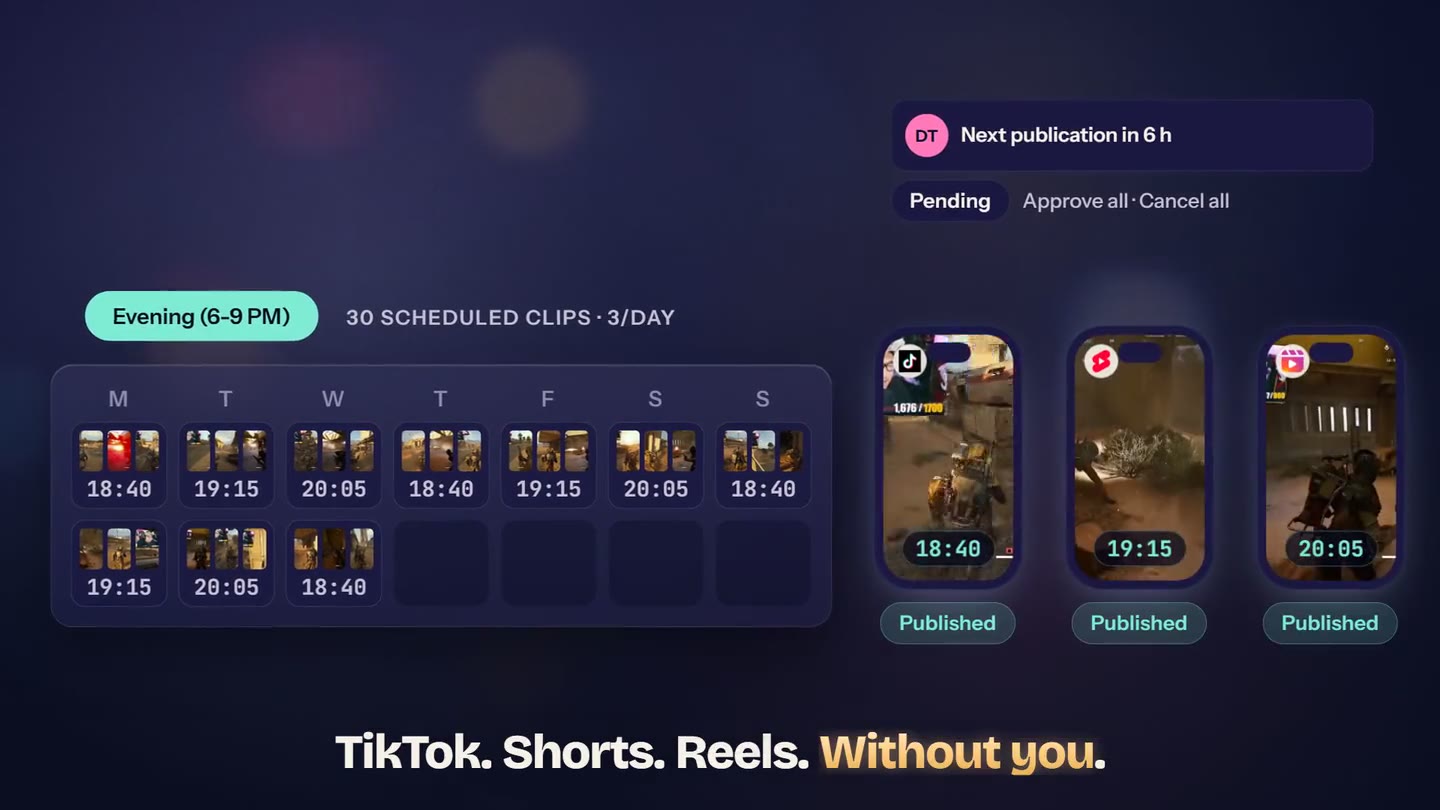 StreamClipping AI AutoPilot: queue your clips, set the slots, and it publishes to your accounts automatically while you stream or sleep.
Wrapping up
There's no universal magic hour. There are strong windows, especially the evening, and there's your specific slot, which you find with platform stats and your own results.
But the real lever isn't the hour. It's consistency. Pick decent slots, hold them, schedule your clips so you don't have to rely on memory.
StreamClipping AI generates your clips and lets you schedule them, free, 15 minutes of video per month for life, no credit card needed.
More reads to go further:
- Turning a 4-hour VOD into a month of short content
- Why your Twitch clips don't pop on TikTok: 7 reasons
- The pro streamer's editorial calendar 2026
Made with love, by a streamer for stream lovers. Ragnarlebroc.